Search Parameter Optimization and Calibration
In peptide-centric DIA search, calibration of the library and optimization of search parameters is required to maximize the number of confident identifications. AlphaDIA performs both calibration and optimization iteratively. Calibration removes the systematic deviation of observed and library values to account for technical variation from the LC or MS instrument. Optimization reduces the search space to improve the confidence in identifications and to accelerate search.
Note
Calibration and optimization are different but both connected to transfer learning. In transfer learning the residual (non-systematic) variation is learned and thereby reduced. This usually leads to better performance if used with optimization and calibration.
Search Space Optimization
AlphaDIA supports two optimization strategies:
Fixed target optimization (e.g., 7ppm mass tolerance)
Automatic optimization for optimal search results
Initial Parameters
AlphaDIA starts with the following default search parameters:
MS1 tolerance: 30 ppm
MS2 tolerance: 30 ppm
Ion mobility tolerance: 0.1 1/K0
Retention time tolerance: 50% of gradient length
Optimization Algorithm
The optimization process follows these steps:
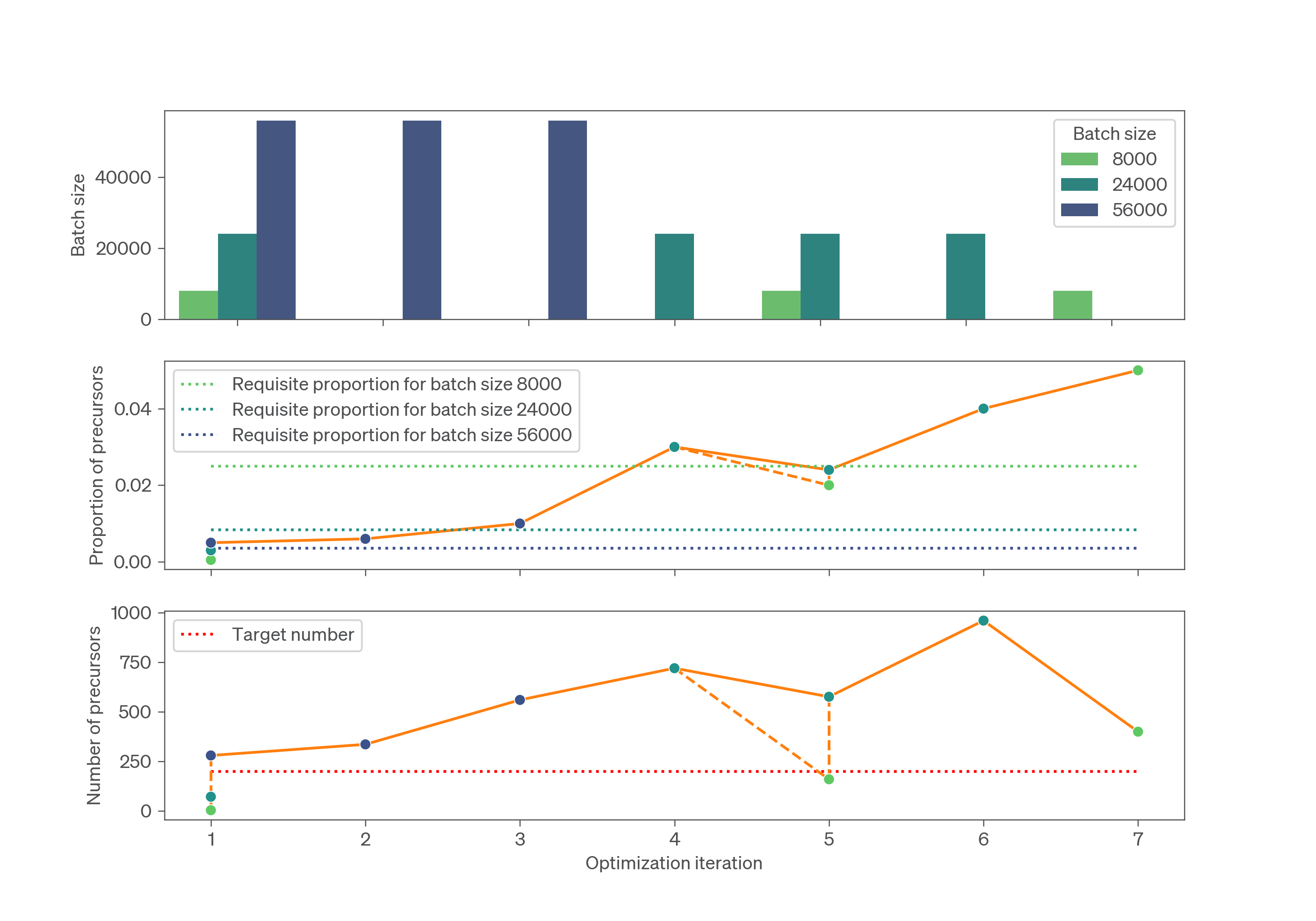
Search is performed batch-wise, starting with the first 8000 precursors
Batch size increases exponentially (16,000, 32,000, 64,000, …) until 200 precursors are identified at 1% FDR
For targeted optimization, the search space is updated to the 95% percentile of identified precursors
For automatic optimization, the search space is set to the 99% percentile
The optimization uses different figures of merit:
MS1 error: Correlation of observed and predicted isotope intensity profile
MS2, RT, and ion mobility: Precursor proportion of the library detected at 1% FDR
Optimization stops when the property of interest stabilizes and the optimal value based on the figure of merit is reached.
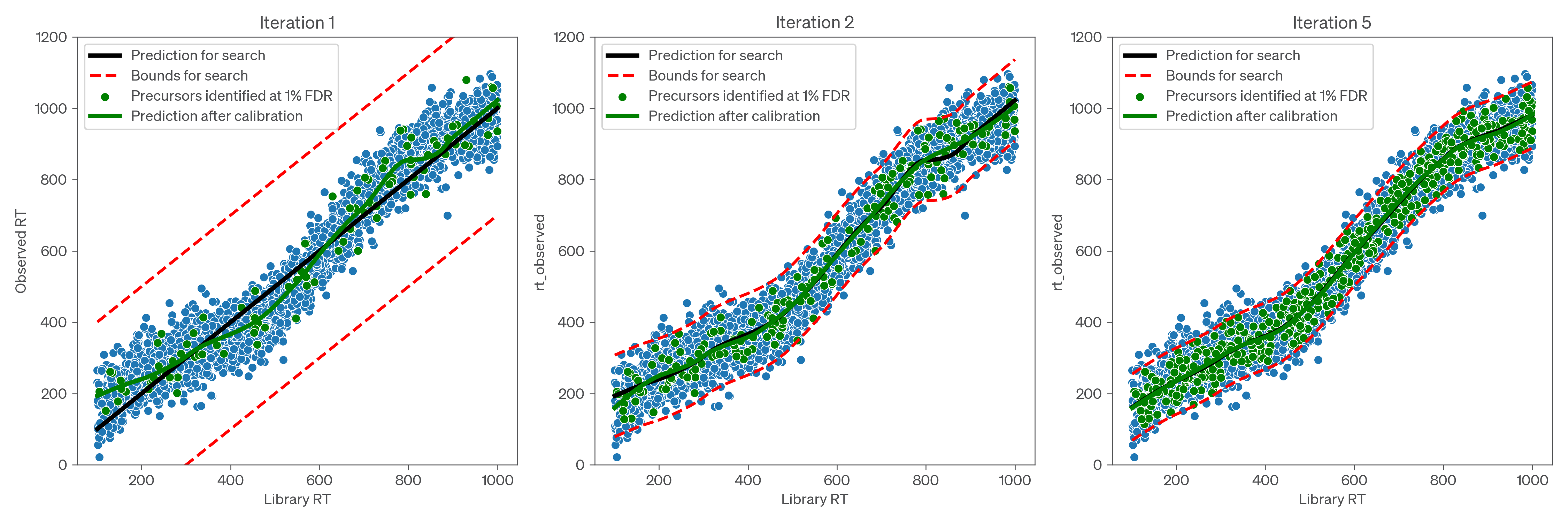
AlphaDIA iteratively performs calibration and optimization based on a subset of the spectral library used for search. The size of this subset is adjusted according to an exponential batch plan to balance accuracy and efficiency. A defined number of precursors, set by the optimization_lock_target (default: 200), need to be identified at 1% FDR before calibration and optimization are performed. If fewer precursors than the target number are identified using a given step of the batch plan, AlphaDIA will search for precursors from the next step of the batch plan in addition to those already searched. If more precursors than the target number are identified, AlphaDIA will check if any previous step of the batch plan is also likely to yield at least the target number, in which case it will use the smallest such step of the batch plan for the next iteration of calibration and optimization. In this way, AlphaDIA ensures that calibration is always performed on sufficient precursors to be reliable, while calibrating on the smallest-possible subset of the library to maximize efficiency.
The process of choosing the best batch step for calibration and optimization is illustrated in the figure below, which shows optimization and calibration over seven iterations; the batch size is increased in the first iteration until sufficient precursors are detected, and subsequently reduced when the proportion is sufficiently high that a previous step should reach the target as well; if, however, fluctuations in the number of identifications mean that not enough precursors are actually identified, the next step in the batch plan will be searched as well to ensure that calibration is always performed on at least the target number of precursors.
Targeted Optimization
To activate targeted optimization for a parameter, set its target value:
For fragment m/z tolerance:
search.target_ms2_tolerance = 10(10 ppm)For retention time:
Absolute value:
search.target_rt_tolerance = 300(300 seconds)Relative value:
search.target_rt_tolerance = 0.3(30% of gradient length)
Automatic Optimization
To activate automatic optimization, set the target value to 0.0:
Example:
search.target_rt_tolerance = 0.0
Tip
We recommend using automatic optimization for retention time and ion mobility (default setting). For mass tolerances, use optimization in the first pass and then apply the optimized values in the second pass.
Calibration
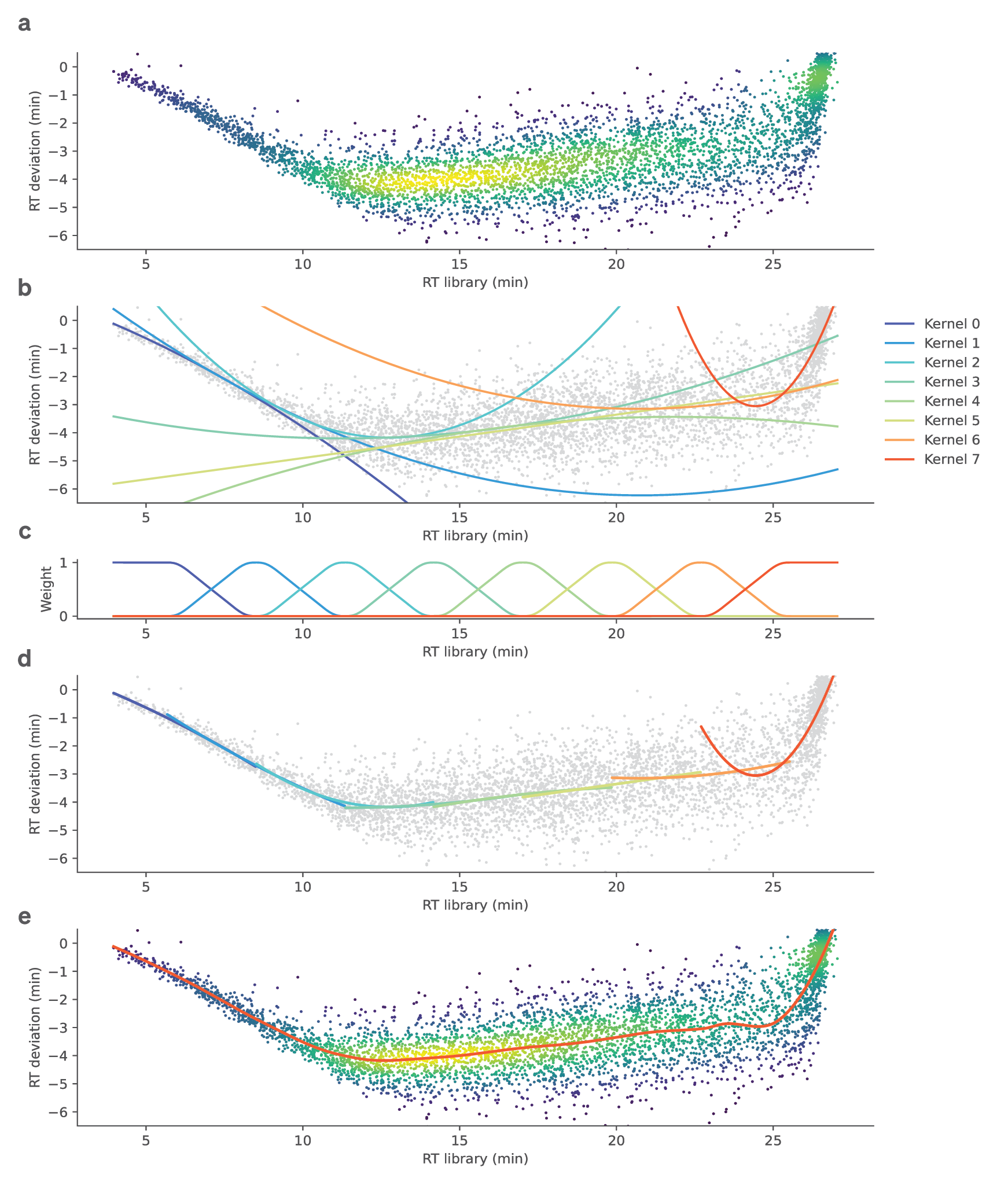
Calibration of systematic deviations occurs in parallel based on confident precursors identified at 1% FDR. Library values are calibrated to match the dataset distribution using locally estimated scatterplot smoothing (LOESS) regression.
LOESS Calibration Model
The calibration process uses:
For fragment m/z: Up to 5000 (minimum 500) of the best fragments based on XIC correlation
For precursors: All precursors passing 1% FDR
The LOESS regression architecture:
Uses uniformly distributed kernels
Applies first and second degree polynomial basis functions
For m/z and ion mobility: Two local estimators with tricubic kernels
For retention time: Six estimators with tricubic kernels
The model is built on scikit-learn and can be configured with different hyperparameters and predictors.
Individual properties like the retention time deviate from their library values and need to be calibrated (a). As a nonlinear but stable method, locally estimated scatterplot smoothing (LOESS) using both density and uniformly distributed kernels is used. (b) A collection of polynomial kernels is fitted to uniformly distributed subregions of the data. These consist of first and second degree polynomials basis functions of the calibratable property. (c) The individual functions are combined and smoothed using tricubic weights. (d) Combining the kernels with their weighting functions allows to approximate the systematic deviation of the data locally. (e), The sum of the weighted kernels can then be used for continuous approximation and calibration of retention times.
Configuring the LOESS Model
The type of model, hyperparameters, and columns used for calibration can be configured in the calibration_manager section of the configuration file.